
Scenes & transitions
A film usually has more than one scene. Scenes divide the story; transitions join two of them.
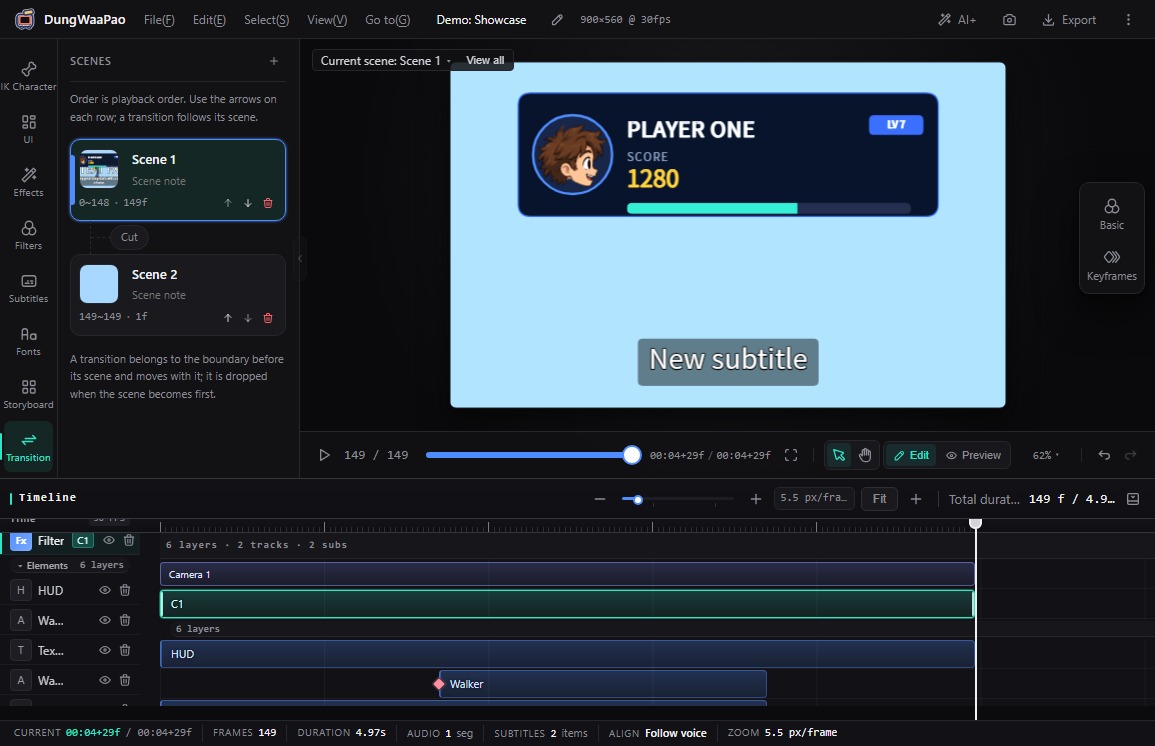
What it does
- Scene flow: the Transition panel lists every scene in playback order. Add, move up/down or delete scenes, and edit names and descriptions in place.
- Independent tracks per scene: each scene keeps its own layers, filter, shots, shot overlays, subtitles and audio tracks.
- Scene transitions: the capsule between cards opens the transition picker with None (hard cut), Cross dissolve, Push left, Push right, Push up, Push down, Wipe left and Wipe right.
- Set length in frames: the transition length is a frame count, capped by the smaller of the scene length and the global limit; a capsule can also remove its transition.
- Content-driven duration: a scene ends at the later of its last layer window and its last audio clip. An empty scene keeps at least 1 frame.
How to use
- Open Transition in the left rail. Scenes run from top to bottom in playback order, with the current scene highlighted.
- Click the capsule between two scene cards and pick an effect. The choice applies immediately; in the preview A is the previous scene and B is this one.
- Enter the frame count (or accept the default) and play across the boundary to check the join.
- Use the arrows on a scene card to reorder. A transition belongs to the later scene and moves with it; it is dropped when that scene becomes first.
- To delete a scene, click the trash button on its card. If the flow becomes empty, an empty scene is created automatically.
::: note The first scene has no transition A transition connects the current scene to the previous one, so the first scene in the flow has no capsule in front of it. :::
Boundaries
- Scene order is playback order. Reorder with the arrows on each card, not by dragging.
- Scene length shrinks to fit its content. There is no manual total-duration field.
- Shot-to-shot transitions are not in this panel; set them from the capsule between adjacent shots in the Storyboard panel.
Next: Shots & camera moves, to see how a scene is framed.